algorithms
Marching Squares
- Published
- 2020-12-29
- Tags
- algorithm, marching squares, perlin noise
One of my goals was to be able to generate topographic maps with nice contour lines given that I think Perlin Noise gives a very nice base to generate the terrain, so I set off to try and draw those curves. After a bit of trial and error all my naive approaches failed and when I searched a bit I came across the Marching Squares algorithm as a likely tool so I decided to tackle that first.
As Wikipedia tersely puts it
Marching squares is a computer graphics algorithm that generates contours for a two-dimensional scalar field (rectangular array of individual numerical values).
The algorithm itself has three steps:
- Taking a grid of values define a threshold - isovalue - and build a binary grid with 1 for values above the isovalue and 0 for all others
- Traverse the new grid looking for 2x2 cells of values and calculate a value for what that combination of 1s and 0s looks like
- Using a contour line lookup table, draw the lines on the screen.
Let me illustrate how I approached the steps:
First, I needed a grid of values, and thanks to Perlin Noise it’s easy to generate one with values that make some kind of sense for this exercise
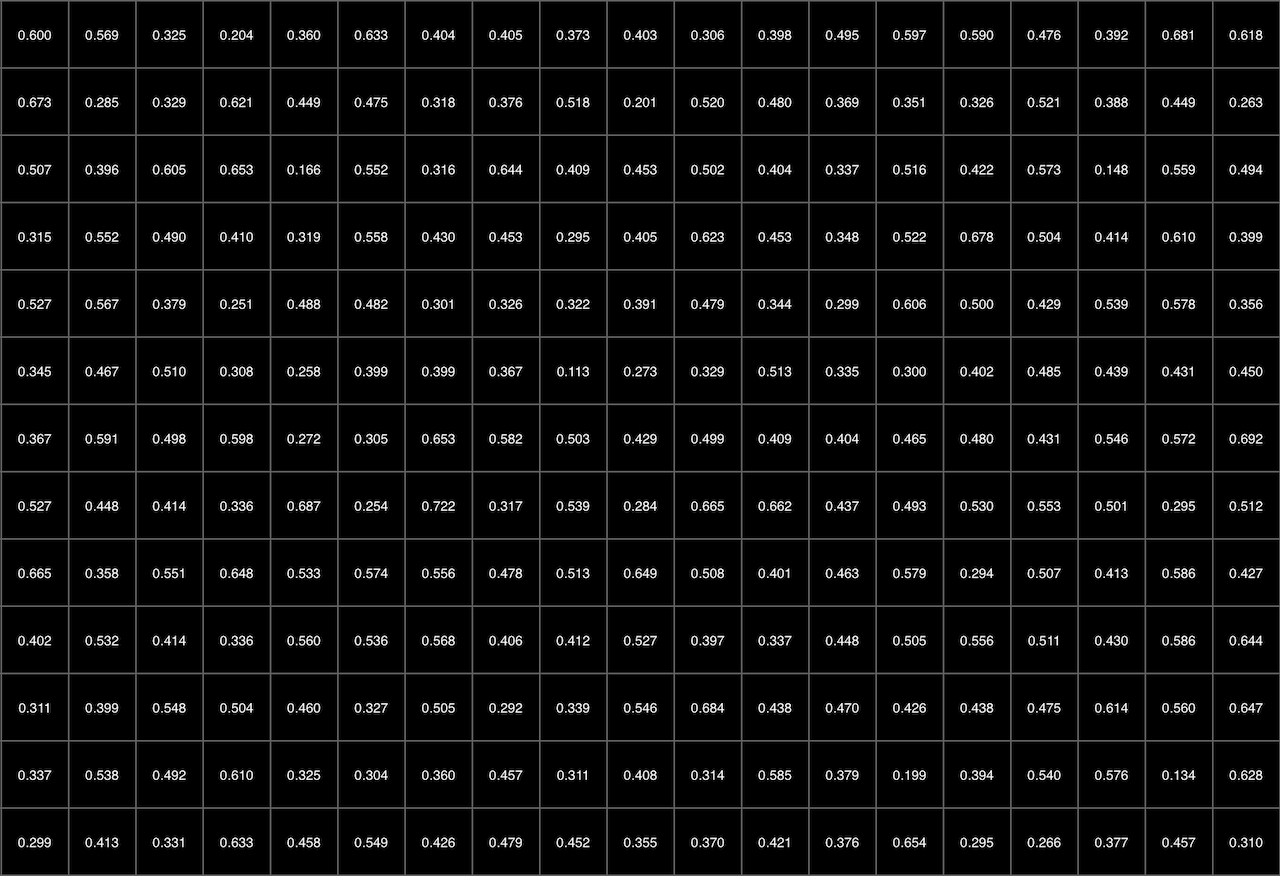
As the perlin noise values range from 0 to 1, I put the threshold (isovalue) at 0.5, anything above that would be a 1 on our new grid. As we’re taking 2x2 chunks of this new grid, we’re centering the result between 4 points, which sort of looks like this
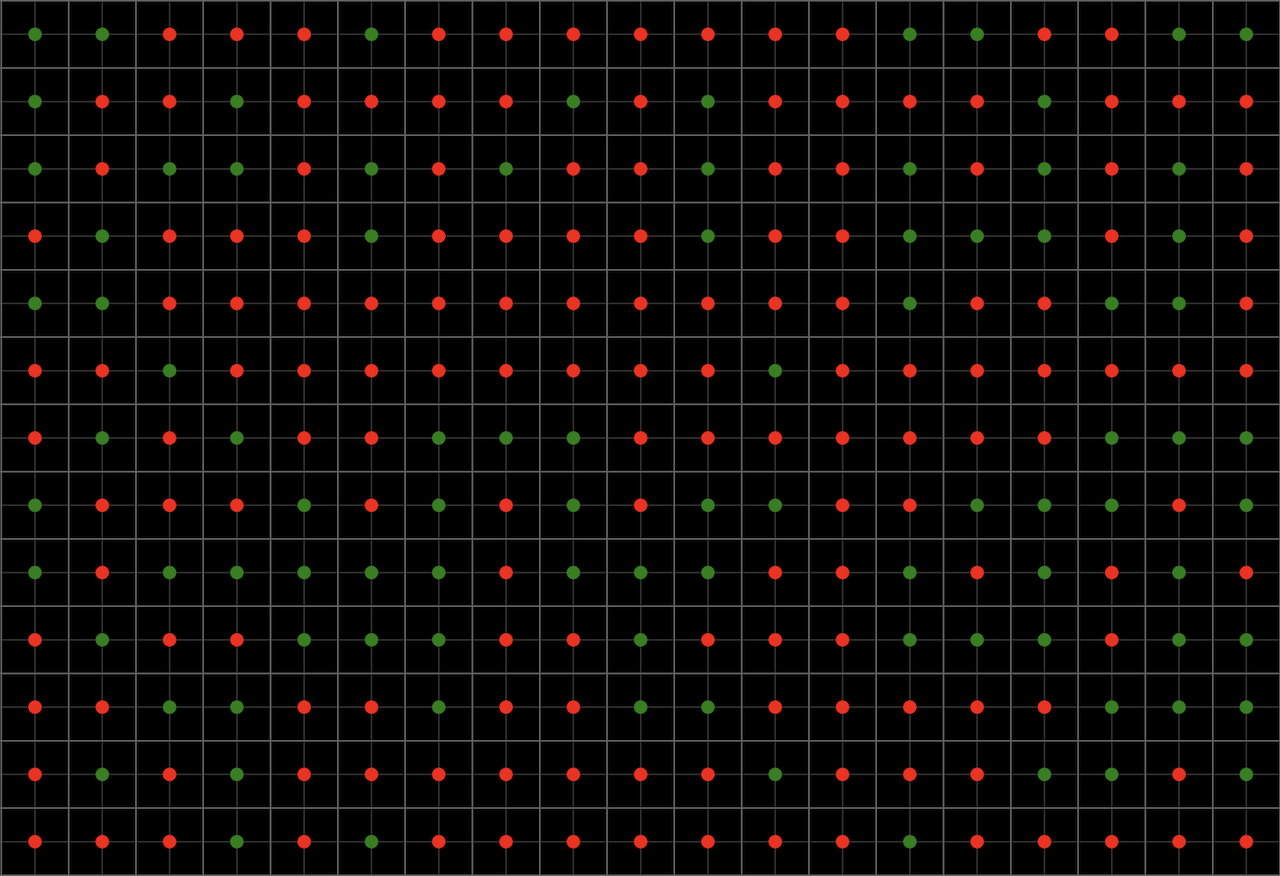
With this in hand we can now build our contour lines and to do that, we need to walk the new grid taking 2x2 cells and mapping them to a specific shape

And so we end up with this
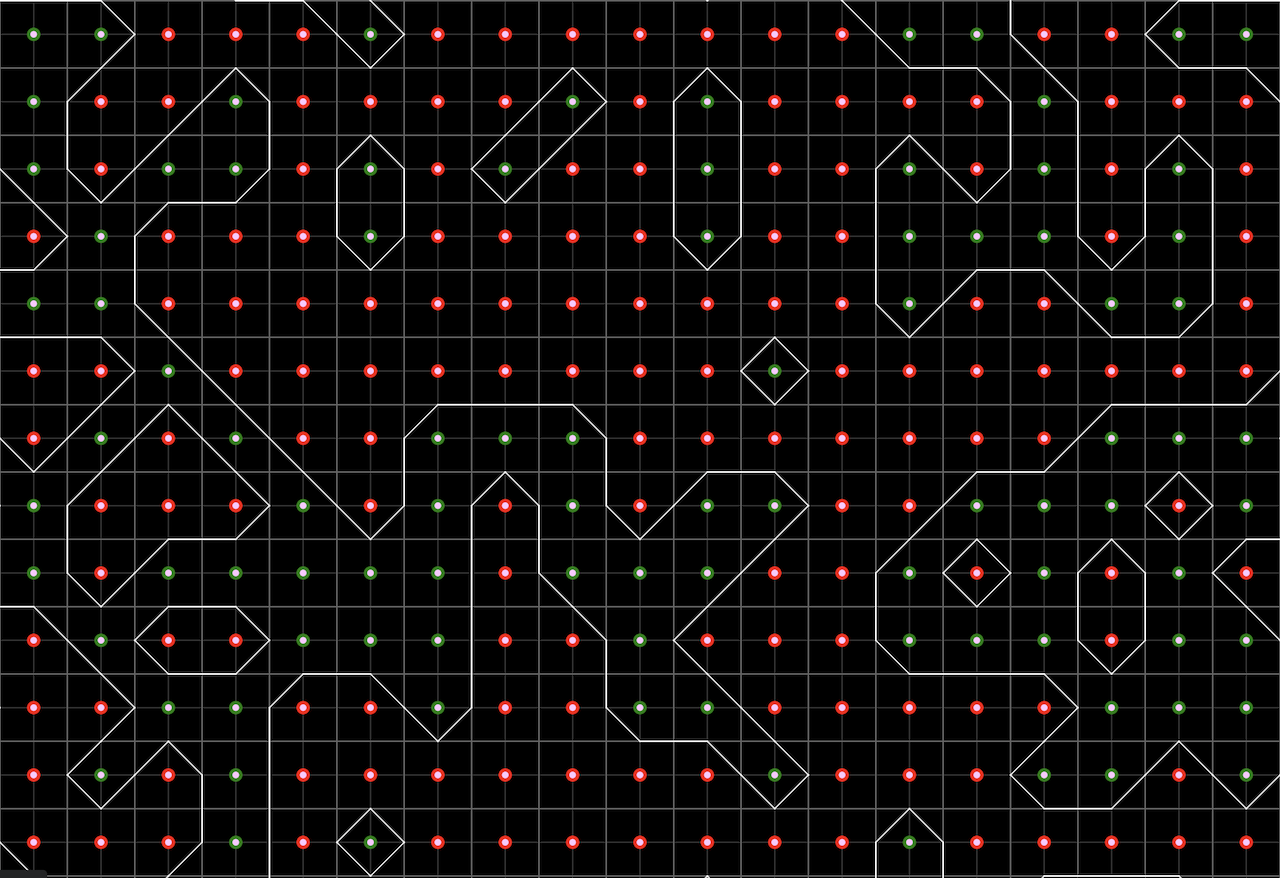
There is a final detail to this last step. The algorithm does require that we:
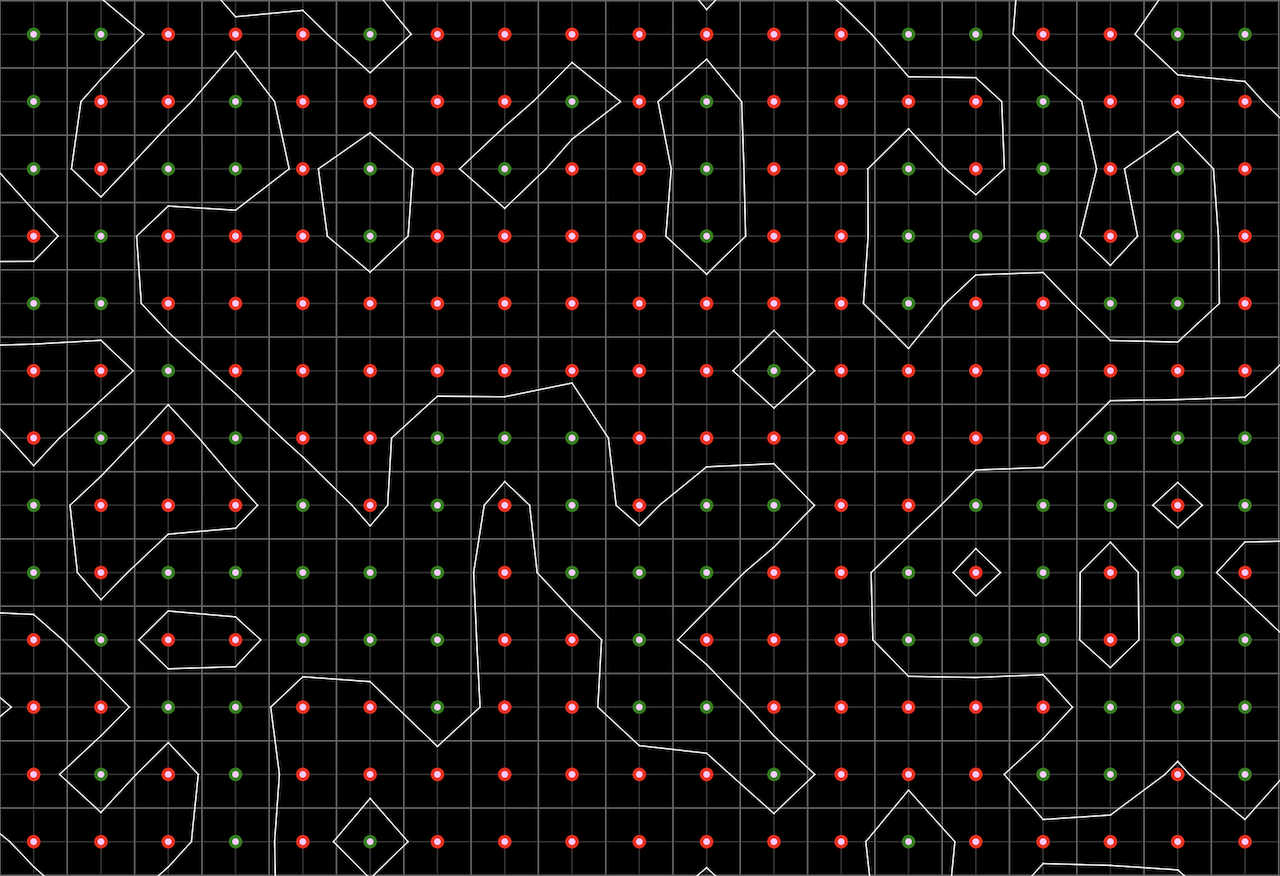
Apply linear interpolation between the original field data values to find the exact position of the contour line along the edges of the cell.
The way I approached this is rather clumsy, what I’ve done was take the two values at the edge I’m drawing the line and sort of calculate a percentage and use that to position the contour line. It does look slightly nicer, but I’m not sure this is the correct implementation (it wasn’t, see the update below).
Update, October 2026
Almost six years later I came back to this one with some help from Claude and, as I suspected, my interpolation was wrong :) I was taking the two values at the ends of an edge, a and b, and putting the line a / (a + b) of the way along it. The problem is that the threshold never shows up in that formula, so there’s no way it can know where the line should cross. What linear interpolation actually wants to know is much simpler: if the value goes evenly from a to b, at what point does it hit the threshold?
t = (threshold - a) / (b - a)
So with a = 0.55, b = 0.1 and the threshold at 0.5, the line should sit about 11% of the way from a, pretty much on top of it, which makes sense since a is barely above the threshold. My version put it at 85%, at the wrong end entirely. Here’s the same field with every crossing at the middle of its edge, which is what marching squares does without interpolation:
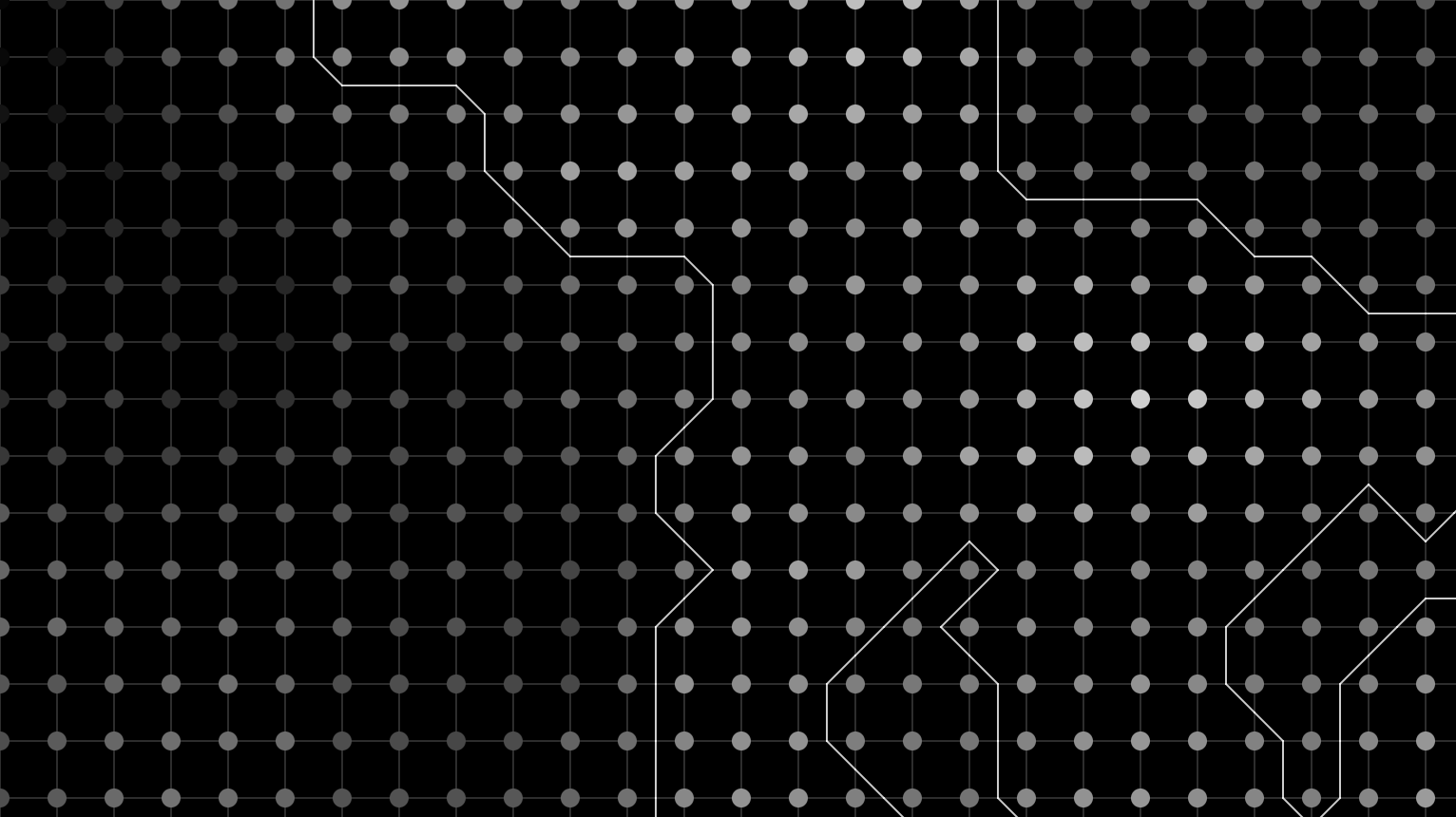
And the same field interpolated properly:
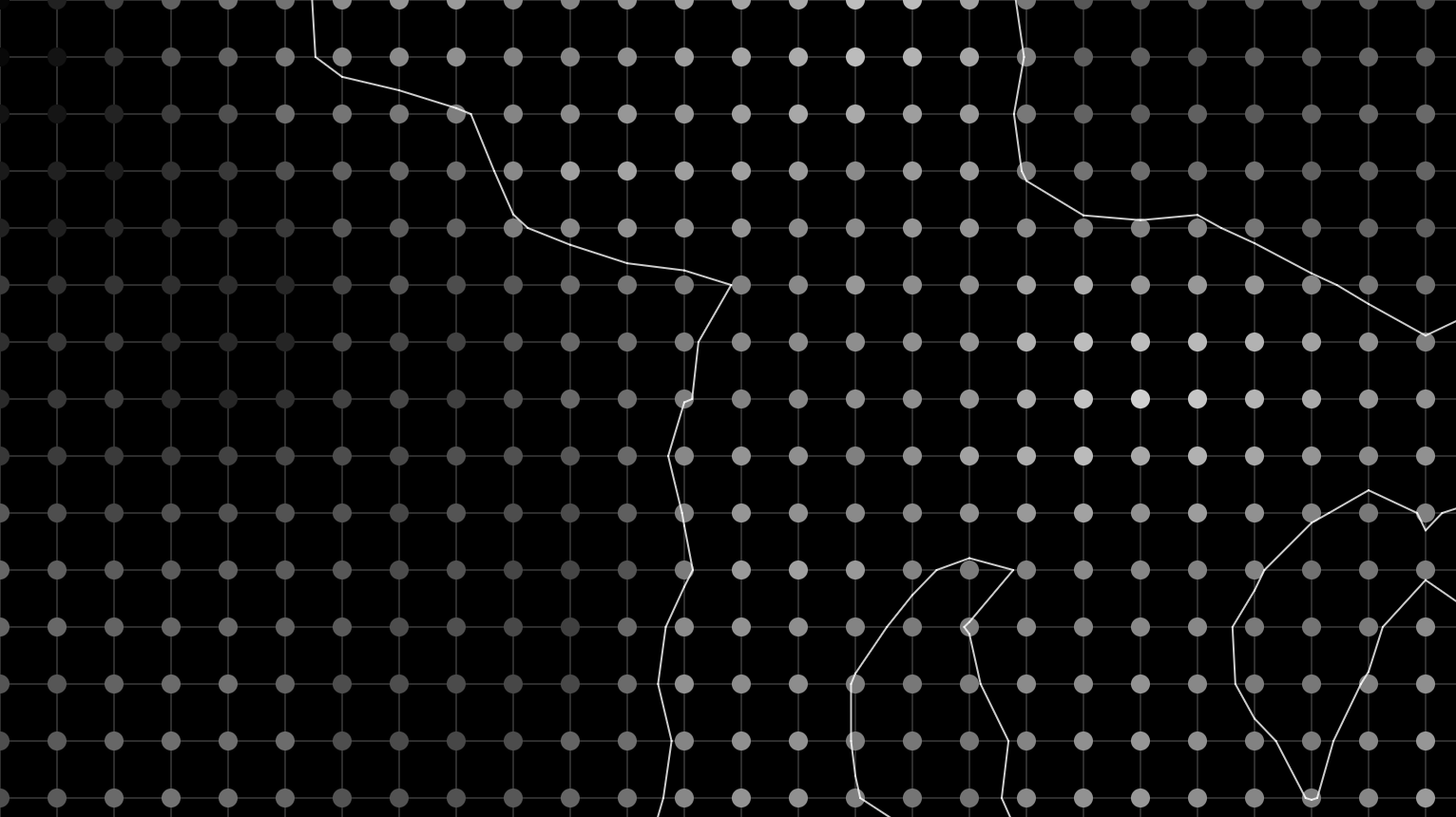
There were a couple of other things holding the sketch back. I was sampling the noise far too coarsely, almost 4 units between grid points, when Perlin noise’s features are about 1 unit across, so neighbouring values had almost nothing to do with each other and my “terrain” was really just random blobs. And I was adding time to the x coordinate, so pressing play just slid everything sideways. Now time moves through the noise’s third dimension, so the terrain slowly reshapes itself instead.
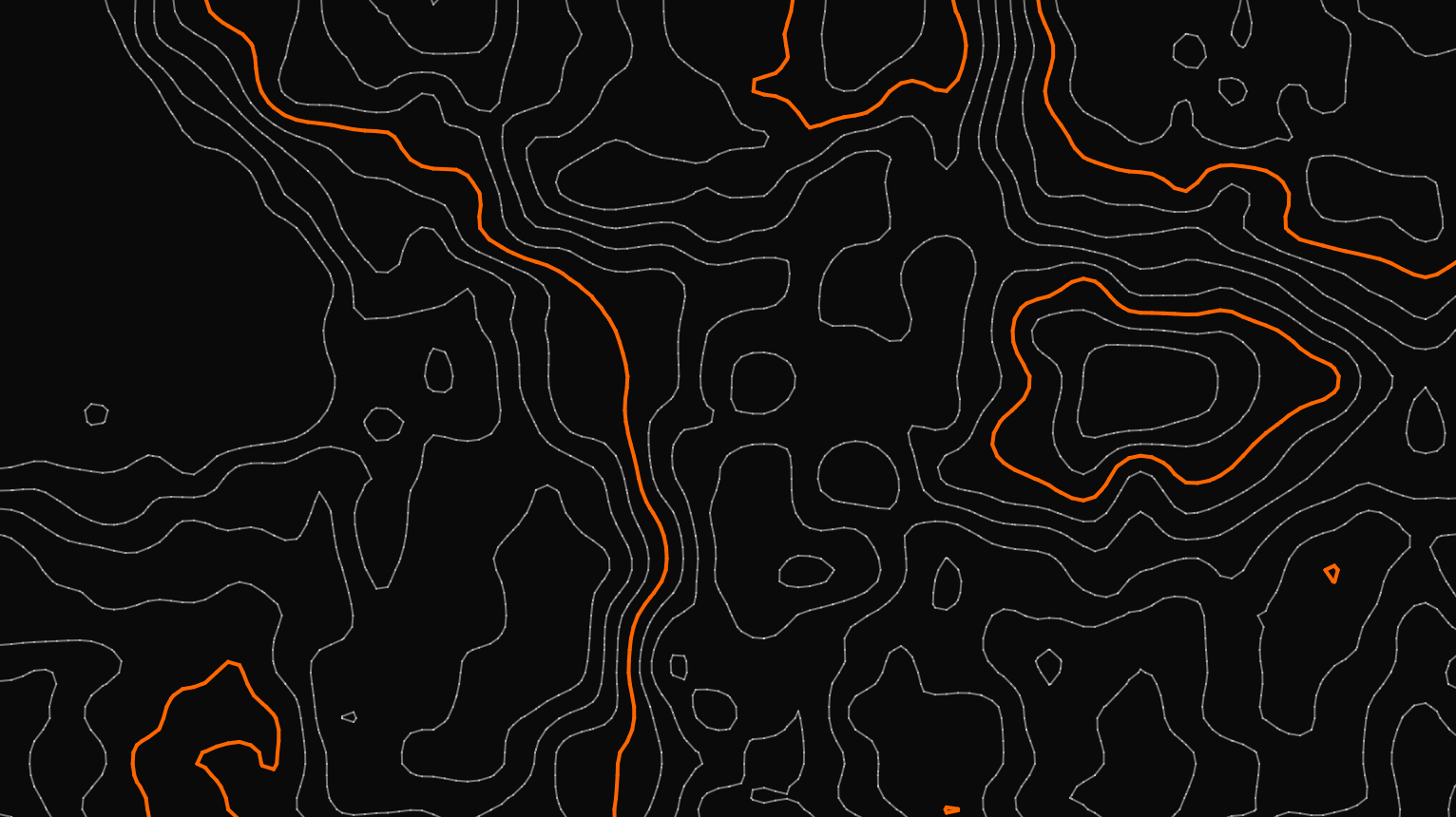
With those fixed I finally got the thing I set out to make in the first place: an actual topographic map. The sketch now draws several contour levels at once, every fifth one heavier like the index contours on a printed map, and can fill the bands between them:
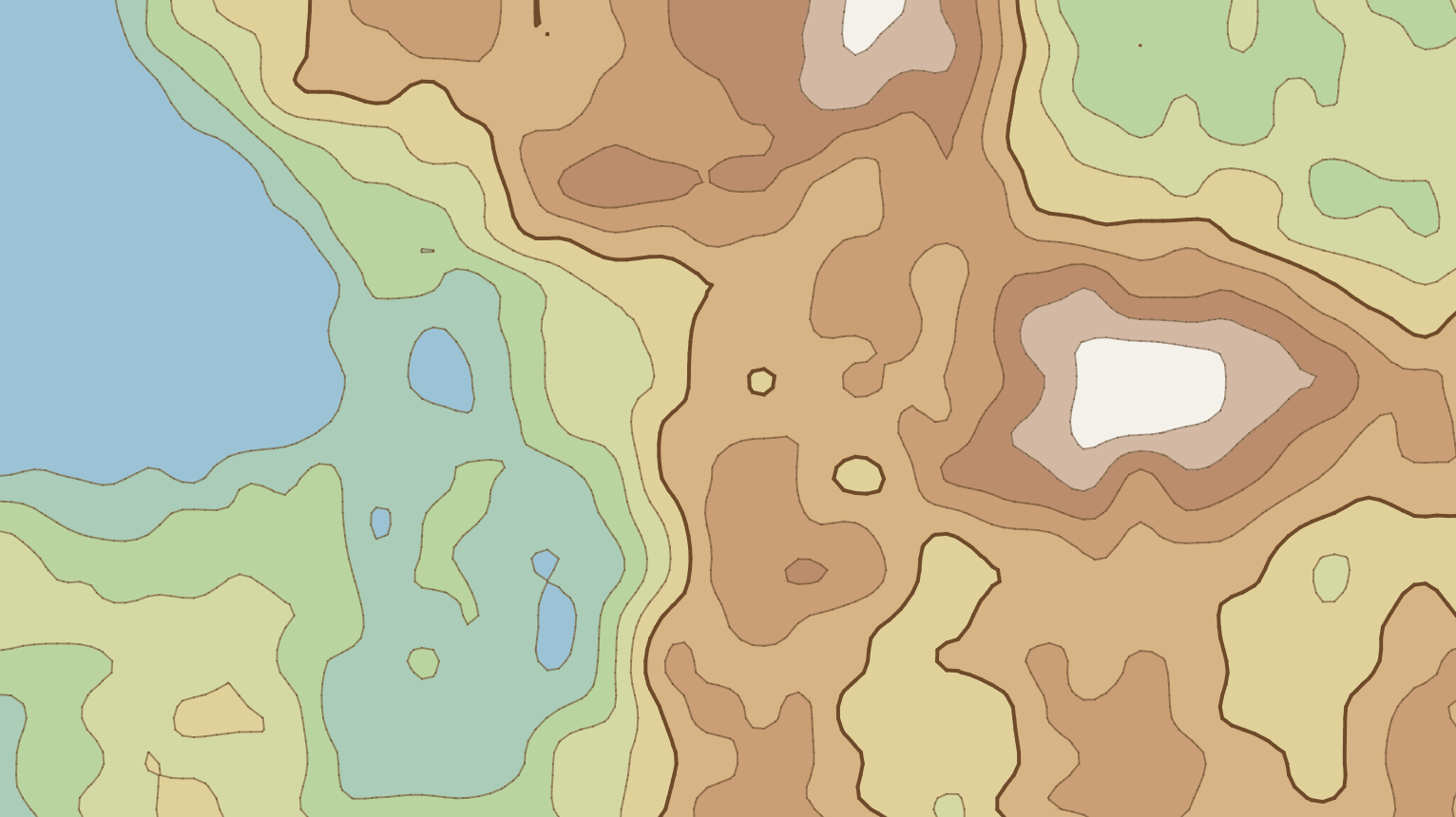
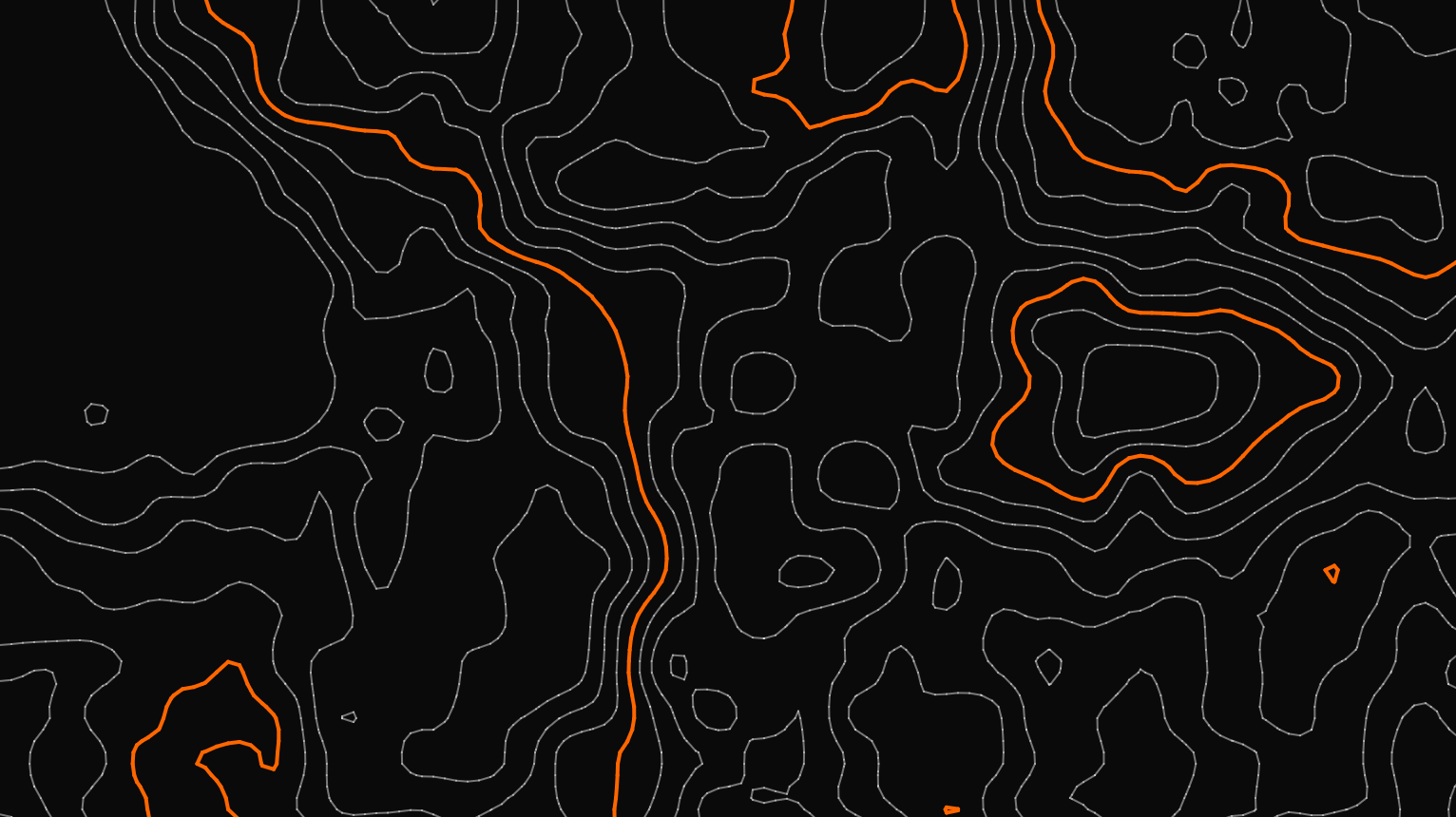
The controls let you change the number of levels, the grid size and the noise scale, fill the bands, or switch interpolation off to see the difference for yourself. A couple of smaller fixes came along too: the ambiguous “saddle” cells (two opposite corners above the threshold, two below) are now decided by the average value at the centre of the cell, and clicking anywhere on the page no longer advances the animation (that one was just annoying).
References:
Source — sketch.js
'use strict'

// Marching squares over a Perlin noise field, drawn as a topographic map.
//
// The field is sampled on a grid of points. For each contour level (a
// threshold, or "isovalue") every 2x2 block of points becomes a cell, its
// four corners are compared against the level, and the resulting pattern
// (one of 16) says which edges of the cell the contour line crosses.
// Several evenly spaced levels drawn on top of each other give contour lines;
// filling the area above each level, lowest first, gives elevation bands.

// Avoiding Global Mode: https://github.com/processing/p5.js/wiki/Global-and-instance-mode
const experiment = ( sketch ) => {
  //
  // Configuration
  //
  let container = document.getElementById('sketch-holder')
  let canvas_el

  let grid_size = 10              // Distance between two sample points, in pixels
  let noise_scale = 0.005         // Noise units per pixel: small is gentle hills, big is rough terrain
  let contour_levels = 9          // How many thresholds to draw, spread evenly across the noise range
  let evolution_speed = 0.003     // How far the third noise dimension moves every frame, zero freezes the map
  let interpolate = true          // Place each crossing where the field actually meets the threshold, rather than mid-edge
  let fill_bands = false
  let debug_mode = false
  let noise_z = 0                 // Time: the third noise dimension, so the terrain reshapes rather than slides

  // p5's noise() rarely strays outside this range, so the levels are spread
  // across it rather than across the full 0..1
  const NOISE_LOW = 0.2
  const NOISE_HIGH = 0.8

  // Every fifth contour is drawn heavier, like the index contours on a
  // printed map, which makes it much easier to read height at a glance
  const INDEX_EVERY = 5

  // The same seed gives the same terrain
  let seed = Math.floor(Math.random() * 1000000)

  // One entry per slider: its [min, max, step], where its value lives and
  // what a new value does. Each one is wired to the elements named after it,
  // "grid_size" to #experiment-control-grid-size and its label
  // #experiment-label-grid-size
  let sliders = {
    contour_levels:  { range: [1, 20, 1],           value: () => contour_levels,  update: value => { contour_levels = value } },
    grid_size:       { range: [4, 40, 1],           value: () => grid_size,       update: value => { grid_size = value; buildField() } },
    noise_scale:     { range: [0.001, 0.02, 0.001], value: () => noise_scale,     update: value => { noise_scale = value; buildField() } },
    evolution_speed: { range: [0, 0.02, 0.001],     value: () => evolution_speed, update: value => { evolution_speed = value } }
  }

  // The grid of sampled noise values, field[x][y], and how many points it has
  // in each direction
  let field = []
  let cols = 0
  let rows = 0

  // Color Schemes
  //
  // `bands` are the colours the filled map runs through from lowest to
  // highest ground; any number of stops, blended evenly. The two "site"
  // schemes use the site's own palette.
  let color_scheme
  let color_sets = {
    site_dark: {
      label: "Site Dark",
      background: "#0a0a0a",
      line: "rgba(255, 255, 255, 0.45)",
      index_line: "#ff6600",
      bands: ["#0a0a0a", "#2a1608", "#5c2a06"]
    },
    site_light: {
      label: "Site Light",
      background: "#ffffff",
      line: "rgba(0, 0, 0, 0.35)",
      index_line: "#b84900",
      bands: ["#ffffff", "#ffe6d4", "#ffc49c"]
    },
    topographic: {
      label: "Topographic",
      background: "#efe9d8",
      line: "rgba(110, 80, 50, 0.6)",
      index_line: "#6e4a2a",
      bands: ["#9cc3d5", "#b5d3a0", "#e4dca4", "#d2a97c", "#b98a6a", "#f4f1ea"]
    },
    blueprint: {
      label: "Blueprint",
      background: "#0b3d91",
      line: "rgba(255, 255, 255, 0.5)",
      index_line: "#ffffff",
      bands: ["#0b3d91", "#1d57b8", "#3a78d8"]
    },
    bw: {
      label: "Black / White",
      background: "#000000",
      line: "rgba(255, 255, 255, 0.8)",
      index_line: "#ffffff",
      bands: ["#000000", "#555555"]
    }
  }

  // Controls
  let controls = {
    color_scheme_picker: document.getElementById("experiment-control-color-scheme"),
    seed: document.getElementById("experiment-control-seed"),
    new_seed: document.getElementById("experiment-control-new-seed"),
    play_pause_toggle: document.getElementById("experiment-control-pause-toggle"),
    restart: document.getElementById("experiment-control-restart"),
    save: document.getElementById("experiment-control-save"),
    fullscreen: document.getElementById("experiment-control-fullscreen-toggle"),
    interpolate: document.getElementById("experiment-control-interpolate"),
    fill_bands: document.getElementById("experiment-control-fill-bands"),
    debug: document.getElementById("experiment-control-debug-mode")
  }

  Object.keys(sliders).forEach(name => {
    let id = name.replaceAll('_', '-')
    sliders[name].control = document.getElementById(`experiment-control-${id}`)
    sliders[name].label = document.getElementById(`experiment-label-${id}`)
  })

  //
  // Control Handling
  //

  function setupControls() {
    Object.values(sliders).forEach(slider => {
      [slider.control.min, slider.control.max, slider.control.step] = slider.range
      slider.control.value = slider.value()
      slider.label.textContent = slider.value()
    })

    Object.entries(color_sets).forEach(([key, scheme]) => {
      controls.color_scheme_picker.add(new Option(scheme.label, key, false, key === color_scheme))
    })

    controls.seed.value = seed
    controls.interpolate.checked = interpolate
    controls.fill_bands.checked = fill_bands
    controls.debug.checked = debug_mode

    updatePlayPauseIcon()
    updateFullscreenIcon()
  }

  // Both toggle buttons hold two icons and show the one for what a click
  // will do next, read from the actual state rather than from counting
  // clicks, so leaving fullscreen with the Escape key keeps the icon right.
  function showIcon(button, name) {
    button.querySelectorAll('svg').forEach(icon => {
      icon.classList.toggle('hidden', !icon.classList.contains(`icon-${name}`))
    })
  }

  function updatePlayPauseIcon() {
    showIcon(controls.play_pause_toggle, sketch.isLooping() ? 'pause' : 'play')
  }

  function updateFullscreenIcon() {
    showIcon(controls.fullscreen, document.fullscreenElement ? 'compress' : 'expand')
  }

  // While paused nothing redraws by itself, so any change has to ask for it
  function refresh() {
    if (!sketch.isLooping()) sketch.redraw()
  }

  function installControlHandlers() {
    controls.play_pause_toggle.addEventListener("click", () => {
      sketch.isLooping() ? sketch.noLoop() : sketch.loop()
      updatePlayPauseIcon()
    })

    controls.restart.addEventListener("click", restart)

    controls.color_scheme_picker.addEventListener("change", event => {
      color_scheme = event.target.value
      refresh()
    })

    Object.values(sliders).forEach(slider => {
      slider.control.addEventListener("input", event => {
        slider.label.textContent = event.target.value
        slider.update(parseFloat(event.target.value))
        refresh()
      })
    })

    // Seed. Typing one in brings that terrain back, the button rolls a new one
    controls.seed.addEventListener("change", event => {
      seed = parseInt(event.target.value) || 0
      controls.seed.value = seed
      restart()
    })

    controls.new_seed.addEventListener("click", () => {
      seed = Math.floor(Math.random() * 1000000)
      controls.seed.value = seed
      restart()
    })

    controls.interpolate.addEventListener("change", event => {
      interpolate = event.target.checked
      refresh()
    })

    controls.fill_bands.addEventListener("change", event => {
      fill_bands = event.target.checked
      refresh()
    })

    // Debug mode shows the sample grid, each point shaded by its value
    controls.debug.addEventListener("change", event => {
      debug_mode = event.target.checked
      refresh()
    })

    controls.save.addEventListener("click", () => {
      sketch.save(canvas_el, `marching_squares_${color_scheme}_seed${seed}_${contour_levels}_${grid_size}_${noise_scale}_${Math.floor(Date.now() / 1000)}`, 'png')
    })

    controls.fullscreen.addEventListener("click", () => {
      sketch.fullscreen(!document.fullscreenElement)
    })

    // p5's fullscreen() puts <html> in fullscreen, not #sketch-holder, and the
    // resize event doesn't reliably wait for the CSS transition that grows
    // the holder, so resize once the change has actually settled.
    document.addEventListener('fullscreenchange', () => {
      updateFullscreenIcon()
      sketch.windowResized()
    })
  }

  //
  // P5.js touchpoints
  //
  sketch.setup = () => {
    canvas_el = sketch.createCanvas(container.clientWidth, container.clientHeight)
    canvas_el.parent(container)

    // Start on the scheme that matches the theme the site is being read in
    color_scheme = document.documentElement.classList.contains('dark') ? 'site_dark' : 'site_light'

    sketch.noLoop() // Show a still map until play is pressed (p5 still draws it once)
    setupControls()
    installControlHandlers()
    resetTerrain()
  }

  sketch.windowResized = () => {
    sketch.resizeCanvas(container.clientWidth, container.clientHeight)
    buildField()
    refresh()
  }

  sketch.draw = () => {
    // Time only moves while playing, so a redraw asked for by a control
    // while paused shows the same terrain, just drawn differently
    if (sketch.isLooping()) {
      noise_z += evolution_speed
      buildField()
    }

    let colors = color_sets[color_scheme]
    let levels = contourLevels()

    sketch.background(fill_bands ? bandColor(colors, 0, levels.length) : colors.background)

    if (fill_bands) drawBands(levels, colors)
    if (debug_mode) drawGrid()
    drawContours(levels, colors)
  }

  //
  // The field
  //

  // Samples the noise at every grid point. Positions are in pixels times
  // noise_scale, so a finer grid samples the same terrain more closely
  // instead of zooming out of it.
  function buildField() {
    cols = Math.ceil(sketch.width / grid_size) + 1
    rows = Math.ceil(sketch.height / grid_size) + 1

    field = []
    for (let x = 0; x < cols; x++) {
      field[x] = []
      for (let y = 0; y < rows; y++) {
        field[x][y] = sketch.noise(x * grid_size * noise_scale, y * grid_size * noise_scale, noise_z)
      }
    }
  }

  // The thresholds, evenly spaced between NOISE_LOW and NOISE_HIGH. A single
  // level lands on 0.5, the one threshold the original version used.
  function contourLevels() {
    let levels = []
    for (let i = 1; i <= contour_levels; i++) {
      levels.push(NOISE_LOW + (NOISE_HIGH - NOISE_LOW) * i / (contour_levels + 1))
    }
    return levels
  }

  //
  // Marching squares
  //

  // How far along an edge, from its first corner (value a) to its second
  // (value b), the field crosses the threshold. With linear interpolation
  // that's (threshold - a) / (b - a): if a = 0.55, b = 0.1 and the threshold
  // is 0.5, the crossing is 0.05 / 0.45 = 11% of the way along, close to a,
  // which is the corner whose value is nearest the threshold. Without it,
  // every crossing sits at the middle of its edge.
  function crossing(a, b, threshold) {
    return interpolate ? (threshold - a) / (b - a) : 0.5
  }

  // The four values at the corners of the cell whose top left corner is
  // grid point (x, y).
  //
  //   tl -- top -- tr
  //   |             |
  //  left         right
  //   |             |
  //   bl - bottom - br
  function cellAt(x, y) {
    return {
      x0: x * grid_size,
      y0: y * grid_size,
      tl: field[x][y],
      tr: field[x + 1][y],
      br: field[x + 1][y + 1],
      bl: field[x][y + 1]
    }
  }

  // Where an edge is crossed for a given threshold, in pixels. Horizontal
  // edges always run left to right and vertical ones top to bottom, so two
  // neighbouring cells compute their shared edge from the same corners in
  // the same order and always agree on the crossing: the lines join up.
  function edgePoint(cell, edge, threshold) {
    let { x0, y0, tl, tr, br, bl } = cell
    switch (edge) {
      case 'top':    return [x0 + grid_size * crossing(tl, tr, threshold), y0]
      case 'right':  return [x0 + grid_size, y0 + grid_size * crossing(tr, br, threshold)]
      case 'bottom': return [x0 + grid_size * crossing(bl, br, threshold), y0 + grid_size]
      case 'left':   return [x0, y0 + grid_size * crossing(tl, bl, threshold)]
    }
  }

  // Each corner above the threshold is one bit of a number from 0 to 15:
  //
  //   8 -- 4
  //   |    |
  //   1 -- 2
  function caseIndex(cell, threshold) {
    return (cell.tl > threshold ? 8 : 0) |
           (cell.tr > threshold ? 4 : 0) |
           (cell.br > threshold ? 2 : 0) |
           (cell.bl > threshold ? 1 : 0)
  }

  // Which pairs of edges the contour joins, for each case. A case and its
  // opposite (1 and 14, say) draw the same line, just with the inside and
  // outside swapped. 0 and 15 are entirely below or above: no line.
  const SEGMENTS = {
    1:  [['left', 'bottom']],
    2:  [['bottom', 'right']],
    3:  [['left', 'right']],
    4:  [['top', 'right']],
    6:  [['top', 'bottom']],
    7:  [['left', 'top']],
    8:  [['left', 'top']],
    9:  [['top', 'bottom']],
    11: [['top', 'right']],
    12: [['left', 'right']],
    13: [['bottom', 'right']],
    14: [['left', 'bottom']]
  }

  // Cases 5 and 10 are saddles: two opposite corners above the threshold, two
  // below, and the pattern alone can't say whether the high corners are
  // joined across the middle or the low ones are. The average of the four
  // corners stands in for the value at the centre and settles it.
  function centreIsHigh(cell, threshold) {
    return (cell.tl + cell.tr + cell.br + cell.bl) / 4 > threshold
  }

  function segmentsFor(cell, index, threshold) {
    if (index !== 5 && index !== 10) return SEGMENTS[index] || []

    // Case 5 has tr and bl high, case 10 has tl and br high. A high centre
    // joins the high corners, so the lines cut off the two low ones; a low
    // centre cuts off the two high ones instead.
    let cut_off_tl_and_br = (index === 5) === centreIsHigh(cell, threshold)
    return cut_off_tl_and_br
      ? [['left', 'top'], ['bottom', 'right']]
      : [['top', 'right'], ['left', 'bottom']]
  }

  //
  // Drawing
  //

  // All the contour lines, gathered first and drawn in two batches (regular
  // and index contours) rather than one line() call at a time
  function drawContours(levels, colors) {
    let regular = []
    let index_lines = []

    levels.forEach((threshold, i) => {
      let target = (levels.length >= INDEX_EVERY && (i + 1) % INDEX_EVERY === 0) ? index_lines : regular

      for (let x = 0; x < cols - 1; x++) {
        for (let y = 0; y < rows - 1; y++) {
          let cell = cellAt(x, y)
          segmentsFor(cell, caseIndex(cell, threshold), threshold).forEach(([from, to]) => {
            target.push(edgePoint(cell, from, threshold), edgePoint(cell, to, threshold))
          })
        }
      }
    })

    drawSegments(regular, colors.line, 1)
    drawSegments(index_lines, colors.index_line, 2)
  }

  function drawSegments(points, color, weight) {
    sketch.push()
    sketch.noFill()
    sketch.stroke(color)
    sketch.strokeWeight(weight)
    sketch.beginShape(sketch.LINES)
    points.forEach(([x, y]) => sketch.vertex(x, y))
    sketch.endShape()
    sketch.pop()
  }

  // Elevation bands. Each level paints the part of each cell that's above
  // it, lowest level first, so higher ground paints over lower and every
  // area ends up the colour of the highest level it's above.
  //
  // Levels a cell is entirely above only need the highest one, painted as
  // a plain square; only the levels that actually cross the cell need a
  // shape worked out.
  function drawBands(levels, colors) {
    sketch.push()
    sketch.strokeWeight(1) // Stroking each shape in its own colour hides hairline seams between cells

    for (let x = 0; x < cols - 1; x++) {
      for (let y = 0; y < rows - 1; y++) {
        let cell = cellAt(x, y)
        let lowest = Math.min(cell.tl, cell.tr, cell.br, cell.bl)

        let solid = -1
        while (solid + 1 < levels.length && lowest > levels[solid + 1]) solid++

        if (solid >= 0) {
          let color = bandColor(colors, solid + 1, levels.length)
          sketch.fill(color)
          sketch.stroke(color)
          sketch.rect(cell.x0, cell.y0, grid_size, grid_size)
        }

        for (let i = solid + 1; i < levels.length; i++) {
          let index = caseIndex(cell, levels[i])
          if (index === 0) break // No corner reaches this level, so none reaches the ones above it

          let color = bandColor(colors, i + 1, levels.length)
          sketch.fill(color)
          sketch.stroke(color)
          insideShapes(cell, index, levels[i]).forEach(shape => {
            sketch.beginShape()
            shape.forEach(([px, py]) => sketch.vertex(px, py))
            sketch.endShape(sketch.CLOSE)
          })
        }
      }
    }

    sketch.pop()
  }

  // The part of a cell above the threshold, as one or two polygons. Walking
  // round the corners, keep each corner that's above it, and add the
  // crossing point wherever the walk passes from above to below or back.
  function insideShapes(cell, index, threshold) {
    let tl = [cell.x0, cell.y0]
    let tr = [cell.x0 + grid_size, cell.y0]
    let br = [cell.x0 + grid_size, cell.y0 + grid_size]
    let bl = [cell.x0, cell.y0 + grid_size]
    let at = edge => edgePoint(cell, edge, threshold)

    // A saddle with a low centre has its two high corners cut off by
    // separate lines, so it's two triangles rather than one shape
    if ((index === 5 || index === 10) && !centreIsHigh(cell, threshold)) {
      return index === 5
        ? [[tr, at('right'), at('top')], [bl, at('left'), at('bottom')]]
        : [[tl, at('top'), at('left')], [br, at('bottom'), at('right')]]
    }

    let walk = [
      [cell.tl, tl, 'top'],
      [cell.tr, tr, 'right'],
      [cell.br, br, 'bottom'],
      [cell.bl, bl, 'left']
    ]

    let shape = []
    walk.forEach(([value, point, edge_after], i) => {
      let here = value > threshold
      let next = walk[(i + 1) % 4][0] > threshold
      if (here) shape.push(point)
      if (here !== next) shape.push(at(edge_after))
    })
    return [shape]
  }

  // The colour for the area above `band` levels (0 is below them all),
  // blended through the scheme's stops from lowest to highest ground
  function bandColor(colors, band, total) {
    let stops = colors.bands
    let position = total === 0 ? 0 : (band / total) * (stops.length - 1)
    let i = Math.min(Math.floor(position), stops.length - 2)
    return sketch.lerpColor(sketch.color(stops[i]), sketch.color(stops[i + 1]), position - i)
  }

  // The sample points and the cells between them, each point shaded by its
  // value from black (0) to white (1)
  function drawGrid() {
    sketch.push()
    sketch.stroke(128, 128, 128, 90)
    sketch.strokeWeight(1)
    for (let x = 0; x < cols; x++) sketch.line(x * grid_size, 0, x * grid_size, sketch.height)
    for (let y = 0; y < rows; y++) sketch.line(0, y * grid_size, sketch.width, y * grid_size)

    sketch.strokeWeight(Math.max(3, grid_size / 3))
    for (let x = 0; x < cols; x++) {
      for (let y = 0; y < rows; y++) {
        sketch.stroke(field[x][y] * 255)
        sketch.point(x * grid_size, y * grid_size)
      }
    }
    sketch.pop()
  }

  // Back to the very start of the current seed
  function resetTerrain() {
    sketch.noiseSeed(seed)
    noise_z = 0
    buildField()
  }

  function restart() {
    resetTerrain()
    refresh()
  }
}

// Wait for everything to load
if (document.readyState === 'complete') {
  new p5(experiment)
} else {
  window.addEventListener('load', () => new p5(experiment))
}